How do you hand over an ai built app to someone who isnt technical?
Hand over the app by deploying it to a Kubernetes cluster the client owns rather than a proprietary sandbox. This gives them a real repository and a live address they control, removing dependence on the builder's credits or platform.
Last updated
Hand over the app by deploying it to a Kubernetes cluster the client owns rather than a proprietary sandbox. This gives them a real repository and a live address they control, removing dependence on the builder's credits or platform.
How do I start the handover process?
Open the chat interface and describe the application you want to build or migrate. For a handover, you must specify the build type as delivery. This is a critical choice made before a single line of code is written because it dictates how the app handles persistence and money. Unlike a demo build, which uses memory-only storage and is meant for showing a concept, a delivery build provisions a real database and ensures that payment gateways are wired directly to the client's own accounts.
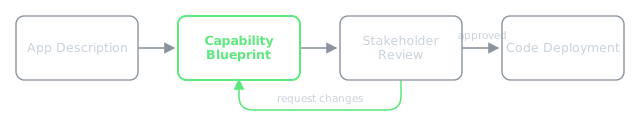
Once you send the description, the platform does not start coding immediately. It returns a capability blueprint. This is a list of every feature the AI believes the app needs. Review this list with the non-technical owner. If the AI assumes a "user profile" is just a name and email, but the client needs a full KYC upload, you change the blueprint here. Fixing a requirement in the blueprint is a text edit. Fixing it after the build requires a full redeploy.
What happens during the build and deploy?
After you approve the blueprint, the manager agent creates a build plan and the builder agent writes the source code into a real repository. This is not a set of snippets in a chat window. It is a standard codebase that can run anywhere Docker runs. The platform then deploys this code to a K3s cluster as a Helm release.
The app will be live at a real address following the pattern <app>.<user>.my-app.engineer. For a professional handover, you can point a custom domain at this address, and the routing layer handles the SSL certificate automatically. To verify the handover is successful, a separate QA agent opens the deployed app in a real browser and tests it against the blueprint. The build is only marked as done once the QA agent confirms the live app actually does what was promised.
How does a non-technical person manage the infrastructure?
The recipient does not need to learn Kubernetes commands to own the app. The platform provides a cluster tools catalogue where they can install essential maintenance tools with one click. To ensure the client doesn't lose their data, they should install Velero for backups. For security, they can install Falco to monitor runtime threats. All these tools land in the same cluster as the app and are reachable without a second login.
If the client wants to reduce their monthly hosting costs to nearly zero, they can use the "bring your own node" path. They can join a physical machine at home to the cluster over a private network. Once the machine is joined, it appears in the node list, and the app's pods can schedule onto that hardware. This transforms the app from a monthly subscription expense into an asset running on their own hardware.
A worked example: Building a Studio Billing Tool
Suppose you are handing over a "Payment Reconciliation Tool for Fitness Studios" to a studio owner. You start the chat with: "Build a delivery-type app that connects to Stripe, identifies failed membership payments, and generates a daily reconciliation report for the owner."
The AI generates a blueprint with capabilities: Stripe API Integration, Failed Payment Detection, Daily Email Reporting, and Owner Dashboard. You approve the blueprint. The builder agent creates the repository and deploys it to the K3s cluster. The app goes live at fitness-bill.studio-owner.my-app.engineer.
The QA agent logs into the live site, triggers a mock failed payment in Stripe, and verifies that the "Failed Payments" table updates in the dashboard. Once verified, you give the studio owner the account access. They go to the cluster tools catalogue, click install on Velero to ensure their financial records are backed up, and the handover is complete. They now own the code, the database, and the cluster.
What usually goes wrong during deployment?
The most common failure is a "crash-loop" during a database upgrade. This happened when an image tag moved from Postgres 15 to 16. Because Postgres cannot upgrade its data directory automatically on start, the container refused the existing data and restarted indefinitely. The fix is to pin the database to a specific major version and perform upgrades as deliberate migrations rather than simple tag changes.
Another real failure occurs when storage replicas are misconfigured on single-node clusters. In one case, Longhorn was set to multiple replicas on a single node. The resulting disk contention and replication traffic starved the etcd control plane, causing the entire cluster to crash-loop. If the client is using a single-node setup at home, you must set the rule to one replica. Redundancy across replicas of the same physical disk is load, not safety.
Finally, some builds may loop forever if a step limit is set too short. The agent reaches the limit, is killed, and is re-dispatched hourly, while the original run continues in the background. This can waste millions of tokens. The current fix is to let the browser decide what is alive and ensure that any work finishing after a timeout is still collected.
my-app.engineer allows you to build apps with AI and deploy them to a K3s cluster you actually own, avoiding the lock-in of hosted builders.