How to get GDPR compliance by self-hosting a production app
You achieve GDPR compliance by moving your app and data from a shared AI cloud to a Kubernetes cluster you own. Self-hosting ensures you control exactly where data resides and who accesses it, removing reliance on third-party data processors.
Last updated
You achieve GDPR compliance by moving your app and data from a shared AI cloud to a Kubernetes cluster you own. Self-hosting ensures you control exactly where data resides and who accesses it, removing reliance on third-party data processors.
How do I migrate a production app to my own cluster?
Start by describing your existing application in the chat. If you have a million-line app with 30% remaining, you describe the current state and the missing features in plain language. The platform does not ask for a formal specification. You explain it as if you were talking to a lead engineer.
The first output you receive is a capability blueprint. This is a list of every feature, integration, and data requirement the AI believes the app needs. Review this list carefully. If the AI misses a specific GDPR requirement, such as a "Right to be Forgotten" deletion trigger, you edit the blueprint here. Fixing an assumption at the blueprint stage is cheap. Fixing it after the builder agent writes the source is not.
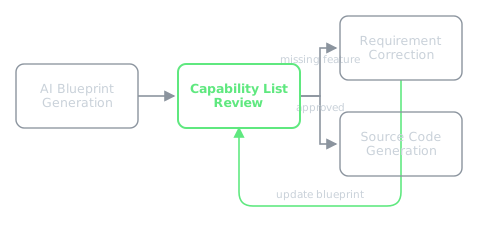
Once you approve the blueprint, the manager agent creates a build plan and the builder agent writes the actual source code into a real repository. This is not a proprietary format or a visual export. It is a standard application that runs anywhere Docker runs. The platform then deploys this as a Helm release onto a K3s cluster.
Which build type should I choose for GDPR and payments?
You must choose a build type before the first line of code is written. For a production app that needs to be compliant and generate revenue, choose the product type.
A product build provisions a real database and automatically handles payment provisioning. This differs from a delivery build, where payments are wired to a client's account, or a demo build, which uses memory-only storage and no payments. If you started with a demo and now need GDPR-compliant persistence, you cannot upgrade in place. You must rebuild as a product because persistence and payment logic reach into every layer of the application architecture.
The result of a successful product deploy is a live address at <app>.<user>.my-app.engineer. At this point, a separate QA agent opens the app in a real browser to verify that the deployed version matches the approved blueprint. The build is not marked as done until the QA agent confirms the functionality.
How do I eliminate cloud costs and control the hardware?
To move from paying monthly fees for Vercel or Supabase to a near-zero running cost, you use the "bring your own node" path. You join your own physical hardware to the existing K3s cluster over a private network.
Once your machine is joined, it becomes a node in the cluster. Kubernetes begins scheduling pods onto your hardware. Because the app is deployed as a Helm release in a namespace that belongs to your account, the data stays on your hardware. This is the core of the self-hosting advantage: the infrastructure is yours from the first deploy, not a sandbox owned by the platform.
To manage the cluster, you use the integrated cluster tools. You can install MinIO for object storage, Velero for backups, and Falco for runtime security monitoring. These tools install into your own cluster and are accessible without a second login.
What happens during a production update?
When you push changes to the repository, the pipeline compares the new paths against the previous commit to identify which services changed. Only the modified images are rebuilt and pushed.
The update is executed using helm upgrade --atomic. This ensures a zero-downtime rolling update on K3s. If a new release fails its health checks, it automatically rolls back to the previous stable version rather than leaving the app in a half-landed, broken state.
If you are moving from a "vibe-coded" setup to this professional infrastructure, you can see how these agents handle the transition in /learn/how-do-you-build-an-app-with-ai-agents.
What common failures happen during self-hosting?
When managing your own nodes and storage, you will encounter infrastructure failures that do not happen in a managed sandbox.
One common failure occurs when Longhorn is configured with multiple storage replicas on a single node. The replication traffic and disk contention can starve etcd, causing the control plane to crash-loop and the cluster to stop responding. The fix is to follow the rule: on a single node, use only one replica. Redundancy across replicas on the same disk is not redundancy. It is unnecessary load.
Another critical failure is the "major version bump." If an image tag moves from Postgres 15 to 16, the container will crash-loop. Postgres does not upgrade its data directory across major versions on start. It will refuse the existing data and restart indefinitely. To fix this, you must pin the database to its major version and perform a deliberate migration rather than a simple tag change.
Finally, you may encounter "ghost runs" where a build exceeds its step limit but continues to run in the background. This happened when a walk was given a step limit shorter than the actual work required. The system killed the run and re-dispatched it hourly, while the abandoned run continued to finish, wasting millions of tokens. The system now allows the browser to decide what is alive, ensuring that work finishing after a timeout is still collected.
my-app.engineer provides the AI agents to build the app and the K3s infrastructure to own it, allowing you to move from a rented cloud to your own hardware.