Cheapest way to bootstrap user auth and metered API keys before revenue
The cheapest way is to build auth and API keys as code in your own application rather than paying a metered SaaS auth provider.
Last updated
The cheapest way to bootstrap user auth and API keys before revenue is to build them as code in your own application rather than paying a metered SaaS auth provider. On this platform you describe the auth and key system you need in chat, the agents write it into a real repository with a Postgres database, and it deploys to a K3s cluster you own where the running cost approaches zero if you bring your own hardware as a node.
How do I use API keys for authentication?
API keys work by generating a random opaque string, storing its hash in your database alongside the user or project it belongs to, and validating it on every request by looking up the hash. The metering part is a counter: each authenticated request increments a usage row keyed to that key, and you check the count against a limit before serving. This is application logic, not infrastructure. It lives in your code, reads and writes to the same Postgres database your app already uses, and costs nothing beyond the database you were already running.
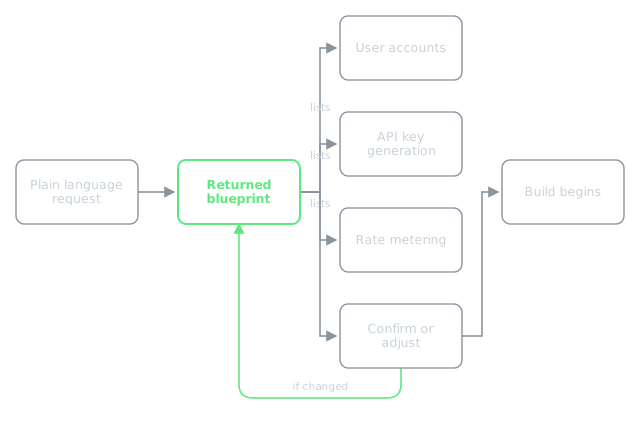
When you describe your app here, you say what you need in plain language. Something like "users sign up, get an API key, each key has a monthly request limit, the API rejects requests over the limit." The blueprint that comes back will list user accounts, API key generation, and rate metering as capabilities. You confirm or change them before the build starts, because after the build the assumptions are harder to shift.
Is Auth0 free to use?
Auth0 has a free tier but the limits and terms are set by Auth0, not by anything here, and you should check their current pricing page for the exact numbers. The trade-off is simple: a managed auth provider charges per monthly active user, and that bill starts before your revenue does. If you build auth into your own app instead, the cost is the compute and database you are already running, and on a cluster where you have joined your own machine as a node that cost is effectively the electricity.
The platform lists SSO as a cluster tool you can install alongside the app. That handles the identity federation side. The user accounts, the API key table, and the metering are built as part of your application by the agents, not provisioned as a separate metered service.
Free user authentication for startups?
The cheapest free user authentication for a startup is the kind you own outright as code in your own repository. You are not paying per user, you are not subject to a provider's free-tier limits, and you are not building on a service that could change its pricing before you have revenue to absorb it. A sign-up flow, a login endpoint, a session token, and an API key table with a usage counter are a few hundred lines of code in a real repository that deploys as a Helm release on K3s with a Postgres database. The QA agent opens the deployed app in a real browser and verifies the sign-up and login flow works before the build is called done.
A real failure worth knowing about: a major Postgres bump from 15 to 16 crash-looped a database because Postgres does not upgrade its data directory across a major version on start. The container came up, refused the existing data, and restarted forever. The database is now pinned to its major version, and a major upgrade is a deliberate migration, never a tag change. If your user table and API key table live in that database, this is the kind of thing that matters. The fix is already in place, but it tells you what the stakes are when auth is your own code on your own database.
How to build a user authentication system?
You describe it the same way you describe the rest of the app. You say what the auth needs to do: email and password sign-up, session tokens, API keys with per-key limits, usage tracking. The manager agent turns that into a build plan, the builder agent writes the source into a repository, and it deploys as a Helm release on K3s. If the app needs a database it gets one. The address it answers on is <app>.<user>.my-app.engineer, and you can point a custom domain at it afterwards with the routing layer handling the certificate.
The build type matters here. A demo build is memory only with no payments and one QA pass, which is fine for proving the auth flow works. But if you later need to take money, a demo is not upgraded in place. It is rebuilt as a delivery or product build, because payments and persistence reach into every part of the app. If you know auth and metered keys are eventually a paid product, build it as a product from the start: real database, payments provisioned automatically, QA up to five iterations.
What my-app.engineer does about this is build the auth and key system as code in your app on a cluster you own, with a Postgres database, deployed as a Helm release, where you can bring your own hardware and drive the running cost toward zero. The SSO cluster tool handles identity federation and the application code handles the rest. You can read more about how the build works at /learn/how-do-you-build-an-app-with-ai-agents and about what production-ready means for a system like this at /learn/what-does-production-ready-actually-mean-for-non-coding-founders.