How do you maintain AI-built apps long term?
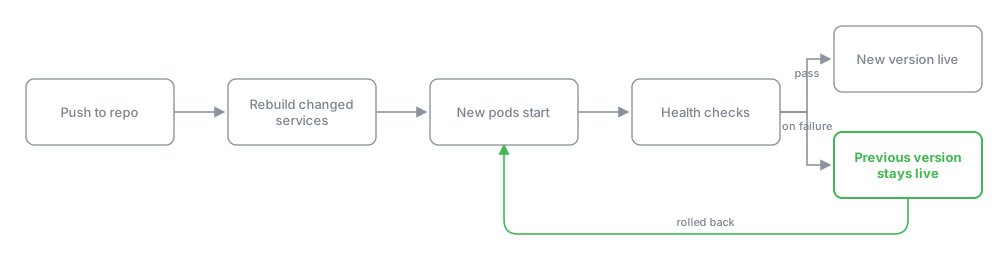
Long-term maintenance here is the same loop as the initial build: you describe a change in chat, agents update the real repository, and a push triggers `helm upgrade --atomic` which rebuilds only the services that changed and rolls back automatically if health checks fail.
Last updated
Long-term maintenance of an AI-built app falls apart in two places on most platforms: you cannot get the source out, and you cannot control the infrastructure underneath it. Here, the source is a real repository from the first deploy and the runtime is a K3s cluster you own, so maintenance is a continuation of the build, not a separate product tier. The same agents that built the app keep working on it, the same pipeline ships changes, and the same cluster tools that protect a hand-built app protect this one.
What happens when you push a change to a running app?
Maintenance starts in chat, the same way the build did. You describe what needs changing, the manager agent produces a plan, and the builder agent writes real code into the repository. When the builder pushes, the pipeline compares paths in the new commit against the previous commit and works out which services changed. Only those images get rebuilt and pushed. Everything else stays as-is, which means a one-line frontend fix does not rebuild your Postgres-backed API.
The rollout is helm upgrade --atomic. On K3s this is a zero-downtime rolling update: new pods come up, pass their health checks, old pods terminate. If the new pods fail health checks, the release rolls back rather than half-landing. You see the old version stay live and the Helm release marked as rolled back in the deploy log.
The address does not change between versions. Your app stays at <app>.<user>.my-app.engineer throughout. A custom domain pointed at it keeps working because the routing layer handles the certificate independently of the release underneath.
How does the QA agent catch a bad deploy?
After helm upgrade --atomic completes, a separate QA agent opens the deployed app in Ghost Browser, which is a real Chromium instance running in the cluster. It checks the app against the blueprint: the capabilities that were agreed on, not a generic smoke test. For a delivery build, QA runs up to four iterations. For a product build, up to five. A demo gets one pass.
The QA agent is not checking that the server responds with a 200. It is driving the real interface, filling real forms, reading real data back. If you added a field to an invoice form, the QA agent fills that field and confirms it persists. If the field is missing or broken, the build is not called done and you see the failure in the QA report before you trust the deploy.
How do you handle database version upgrades?
Database versions are pinned to their major version after a real incident. An image tag moved from Postgres 15 to Postgres 16, and Postgres does not upgrade its data directory across a major version on start. The container came up, refused the existing data directory, and restarted forever. The database crash-looped until someone intervened manually.
The fix is now a rule, not a setting: the Postgres image is pinned to its major version. A major upgrade is a deliberate migration, never a tag change. If you need to move from Postgres 15 to 16, you describe that in chat, the agents plan the migration as a distinct piece of work with a data backup step, and it ships as a planned change rather than an incidental one.
For the worked example: say you have a delivery app called invoicer running at invoicer.alice.my-app.engineer. It is a Postgres-backed API with a frontend that lists and creates invoices. You need to add a "tax_rate" column to the invoices table and a corresponding field on the create form. You describe this in chat: "Add a tax rate field to invoices, defaulting to 0, and show it on the create form next to the amount."
The manager agent returns a plan with three steps: a migration adding the tax_rate column with a default of 0 to the invoices table, a backend route change accepting the field, and a frontend form update. The builder agent writes the migration, updates the route, updates the form component, and pushes. The pipeline detects the backend and frontend paths changed, rebuilds both images, and runs helm upgrade --atomic. The migration runs as an init step before the new backend pods start, the column is added, the new pods pass health checks, and the rollout completes. The QA agent opens the app in Ghost Browser, navigates to the create invoice form, fills in the amount and tax rate, submits, and confirms the new invoice appears in the list with both fields. You see the QA report marked passed, and invoicer.alice.my-app.engineer now shows the tax rate field.
If the migration had failed, say because a NOT NULL constraint without a default was added to a table with existing rows, the new backend pods would fail to start, health checks would fail, and helm upgrade --atomic would roll back to the previous release. The database migration would need to be reworked with a default value or a backfill step before the next push.
What about backups and monitoring?
Velero and Falco install into the same cluster from the catalogue, reachable from the account without a second login. Velero handles backups of the cluster state and persistent volumes. Falco monitors runtime behaviour and flags unexpected process execution or file access inside containers.
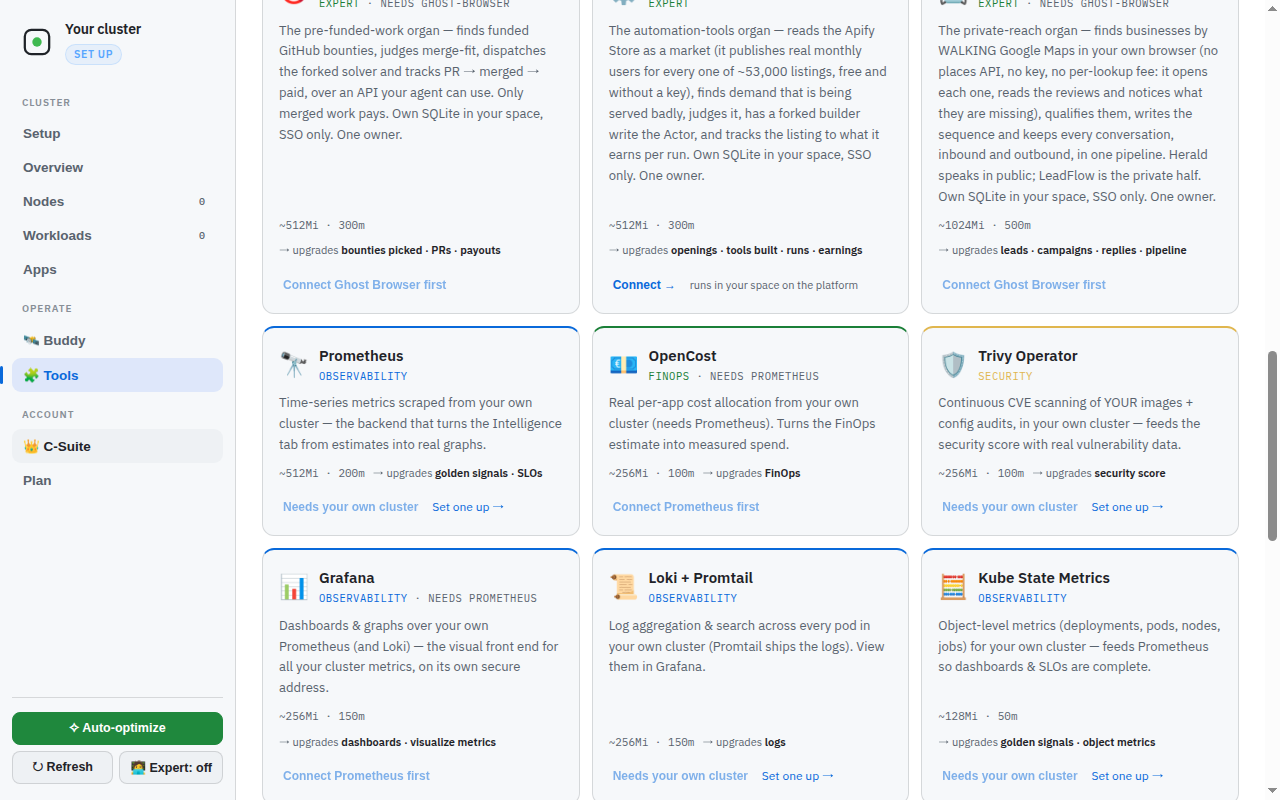
These are the same tools you would install on a hand-built Kubernetes cluster. The difference is that they are one-click from the catalogue and they are wired into the same namespace structure as the app, so they protect the app that is actually running rather than a generic workload profile.
What failures actually happen during maintenance?
Three real incidents on this platform are worth more than general reliability advice. The Postgres 15-to-16 crash-loop is covered above. The other two:
Storage replicas starved etcd. Longhorn was configured with multiple replicas on a single node. The replication traffic and disk contention starved etcd until the control plane crash-looped and the cluster stopped responding. The fix is a rule: on a single node, one replica. Redundancy across replicas of the same disk is not redundancy, it is load. If you join a second node via BYON and want replication, that is when you increase the replica count, not before.
A build capped its own steps and looped forever. A build walk was given a step limit shorter than the work honestly took, so it was killed and re-dispatched hourly. The abandoned run kept finishing successfully with results nobody collected. Eight runs in one night, millions of tokens wasted. The fix was structural: the browser now decides what is alive, and work that finishes after a timeout is still collected rather than discarded. If you are managing a long-running build or migration through chat, do not set an aggressive step limit. Let the work take the steps it needs.
What does this platform do about maintenance that a hosted builder does not?
Because the cluster is yours, maintenance is something you can take with you. The source is a repository you could clone and run anywhere Docker runs. The Helm release is standard Helm. The database is standard Postgres. If you decided to leave tomorrow, you would git clone the repo, helm uninstall the release, and kubectl apply the same charts on another cluster. The maintenance loop here is open, not a product feature that disappears when you stop paying. For more on the build flow that maintenance extends, see /learn/how-to-build-an-app-with-ai-agents and /learn/ai-app-builder-self-hosted-kubernetes-tutorial.